

Print Reviews | Online Reviews | Users Reviews | Blog Mentions
Print Reviews
|
|
|
|
|
|
|
|
|
|
|
|
|
|
|
|
|
|
|
|
|
|
|
|
|
|
|
|
|
|
|
|
|
|
|
|
|
|
|
|
|
|
|
|
|
 GIMP Magazine
 The Old Schoolhouse
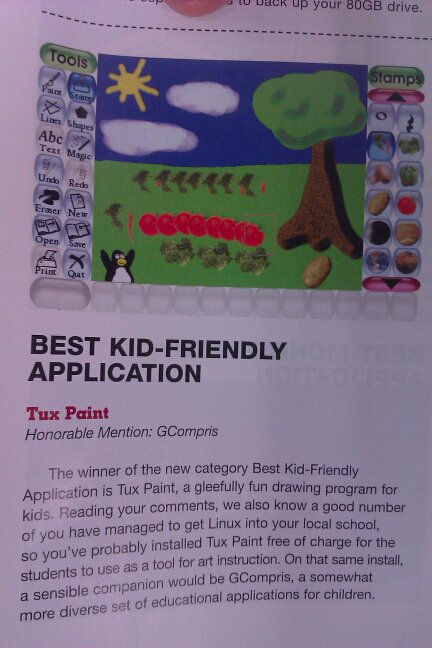 Linux Journal
 Linux Journal
 OnCUE Journal
 Library Media Connection
 Mothers Matter
 De Telegraaf
 The New Indian Express
 The Big Deal Book
 Learning Magazine
 Community Kids
 AppleSauce
 THE Journal
 Scholastic Instructor
 SchoolArts Magazine
 Macworld Magazine
 The Guardian
 Computers in Libraries
 Micro Hebdo Magazine
 Linux Journal
 MacAddict
 Computer Idee
 Hospodářských Noviny
 PC Projects
 Easy Linux
 Linux Journal
 Linux-Magazin
 Revista do Linux
 Linux Magazine
Online Reviews
- "Using Tux Paint as his tool of choice – software similar to Microsoft Paint – the designer has created a bold and blocky publication devised from his lunchtime walks in nature. [...] the tool was a fitting choice for the project, which sees a merging of painterly landscapes with the more "blunt" and digital brushes that can only be made through the computer." - Jules Janssen's playful new book is inspired by 'too much screentime', January 19, 2022
- Make Use Of included Tux Paint among their list of The 5 Best Education Services and Apps for Kids on Windows, in December, 2021. "Let your kids soar with their clever imaginations using the Tux paint Windows app!" They also included in their list of The 10 Best Linux Apps for Digital Artists that month, as well.
- Tux Paint was reviewed by Free Apps For Me in November, 2021. "Are your children fond of painting? In this case, you should definitely try a magnificent tool – Tux Paint."
- Make Use Of included Tux Paint among their list of The 7 Best Open-Source Paint Alternatives for Linux, in July, 2021. "Many woke parents introduce Linux to their children at a very tender age to familiarize them with the Linux environment. If you want your children to reap the benefits of a good, stable drawing application, then Tux Paint is going to be a perfect fit for your needs."
-
Tux Paint was
reviewed by the Apkmonk Blog in February 2021, and gave it 4.8 out of 5 stars.
"[The sound] is an instant attention grabber for kids, who will find great fun in not only the visuals but also the varied fun sound effects. ... All in all, Tux Paint makes for a great, free painting tool that has countless combinations and functions to help young and aspiring students draw, play with colors, or simply improve their computer mouse usage and coordination." - Tux Paint was "Program of the Week" in December 2020, ABCdata
 "[If] you need an application that is straightforward, then Tux Paint
is ideal for you. It's easy to use and manageable. Besides, it consists
of different features that will entertain your kids for sure, especially
the sound effects feature." "Editor's Choice"
- MadDownload.com, August 29, 2020.
"[If] you need an application that is straightforward, then Tux Paint
is ideal for you. It's easy to use and manageable. Besides, it consists
of different features that will entertain your kids for sure, especially
the sound effects feature." "Editor's Choice"
- MadDownload.com, August 29, 2020.
- "I'm not kidding, Tux Paint is one of the best open-source paint applications for kids between 3-12 years of age. Of course, you do not want options when you want to just scribble. So, Tux Paint seems to be the best option in that case (even for adults!)" It's FOSS, June 1, 2020.
- "I work at a public library with 28 Linux stations made publicly available in four separate rooms. The room in which I spend most of my time has 10 computers, and elementary and middle school students stop by daily after school to use them. About 90 percent of the children use the computers for games, and about 10 percent use them for doing homework. Very few use the computer for creative graphics applications. I'm bent on changing that. [...] Somehow, the word about TuxPaint spread throughout our community. Older elementary school students started exploring it in our computer center. A few days later, a middle school boy asked how he could use TuxPaint on his computer. This is a boy who has spent hundreds of hours playing first-person shooting games." The day TuxPaint became contagious, OpenSource.com, May 4, 2012.
- Tux Paint was once again picked in the "Best Kid-Friendly Application" category in Linux Journal magazine's 2011 Readers' Choice Awards, December 1, 2011.
- "Kids tend to love both art and computers, so anything that brings these two things together is bound to go over well. Tux Paint is a drawing program that is both easy enough for kids to use and full of fun features and sounds. It may drive parents a little batty, but kids will definitely get a kick out of it. ... We particularly liked the magic tool, which includes all kinds of cool effects and graphics. ... We recommend this program to all users." 4-stars, "Excellent" rating - Cnet Download.com, July 5, 2011.
 Tux Paint was chosen as "Project of the Month" at SourceForge in June 2011. An interview with lead developer Bill Kendrick was posted in the SourceForge Blog.
 - "Great paint program that comes along very playful." 5-star review at CHIP Online, December 30, 2010.
- Tux Paint was 'Download of the Day' on the Kim Komando Radio Show, September 24, 2009.
- "Looking for a wonderful image program for your children (or inner child)? Tux Paint makes a terrific addition to your family's computer whether you are using Windows, Linux, or Mac. ... [In Tux Paint Config., the] 'Saving Tab' area gives you some wonderful choices in how to handle saving images (especially helpful to keep from accidentally overwriting a saved image). ... Tux Paint is a terrific program for your children (or you) to have hours and hours of fun with. This is definitely a recommended install for everyone's family computer." - How-To-Geek, September 23, 2009.
- "Trapezoid prisons? That sort of makes sense, but it's certainly a novel way to learn about geometry. Welcome to the College 4 Kidz at Mount San Antonio College. Where learning is a fun way to spend part of the summer vacation. [...] The kids in Susanna Mruz's computer animation class seemed to be having a good time. The day before, the students had downloaded Tux Paint programs in their computers. 'I want to become an animator,' said Angelina Eddins, 11, of West Covina. The sixth-grader at Merlinda Elementary, experimented with the award-winning drawing program. Eddins tried a different drawing tools that offered interesting effects. 'This is fun,' exclaimed 10-year-old Dawson Rogers, who goes to Mt. Calvary Lutheran School in Diamond Bar." - Inland Valley Daily Bulletin, Ontario, California, August 4, 2009.
- "While some educators have been quick to grasp the potential and promise of open source software, many others have been hesitant to stray from the comfortable zone of commercial applications. Yet that's changing. [...] These educators are beginning to see that the open source philosophy has the power to transform education in several key ways. First, schools can use open source apps to replace costly commercial software and free up resources for other purposes. [...] Finally, open-source software gives educators more options than ever before. Today, instructors have dozens, if not hundreds, of options for free and open source applications that help them present lessons on everything from learning the ABCs to modeling the complex interactions of molecules during biochemical processes. [...] Tux Paint [is] most suitable for kids in preschool through second grade." - Datamation, July 27, 2009.
- "Foster drawing talent by making it fun: 'Our 10-year-old daughter is very interested in drawing comic book characters and does it pretty well. Is there a DVD, book, CD or computer program that could enhance her talent that you and other parents can recommend?' [My] 10-year-old nephew started using Tux Paint and has really blossomed within the past couple of years in general drawing skills. You might introduce the program to your daughter and go from there." - STLtoday.com, St. Louis, Missouri, "Parent to Parent" column, July 23, 2009.
- "100 Open Source Apps for Windows: Many Windows users find themselves attracted to the idea of open source software, but aren't quite ready to go all the way and commit to Linux on the desktop. However, they might be willing to make a smaller change, like replacing Internet Explorer with Firefox or switching from Microsoft Office to OpenOffice.org. With open-source newbies like these in mind, we've compiled a list of 100 Open-Source Apps for Windows. For this list, we've focused on helpful tools for home or home business users, particularly apps that don't require a lot of technical expertise to download and install. [...] #28. Tux Paint: Designed for kids 12 and under, Tux Paint is an award-winning drawing program that features an easy-to-understand interface, silly sound effects, and hundreds of pre-loaded images and 'rubber stamps.' And Tux the Linux penguin provides help as needed." - Datamation, June 23, 2009.
 "Tux Paint 0.9.20b, has been tested 100% clean and rated 5 stars on
GearDownload.com."
- GearDownload.com, May 26, 2009.
"Tux Paint 0.9.20b, has been tested 100% clean and rated 5 stars on
GearDownload.com."
- GearDownload.com, May 26, 2009.
- "If you have a job, chances are you use a computer each day and that's why schools teach students computer skills early. However, while some youngsters get to use a PC or Mac at school, some can't at home - they cost too much money. There's good news for Elgin Elementary, though. A soldier stationed at Fort Sill is doing seeing to it that every student has one. ... Roecker created his own project - 'Reprise.' 'I realized I could get people to donate their own machines,' he said. 'I could fix them up, put Ed Ubuntu on there, and get that back out to kids that need them.' The program - Ed Ubuntu - will give families the tools that will help children of all ages. 'Tux Paint is a simple painting program,' he said. 'It teaches the kids how to use a mouse.'" - KWSO 7 News, January 14, 2009.
- "10 ways to spend less, give more! While comparison shopping, shopping sales and pruning your gift list are viable ways to save some money on gifts, there are other creative ways to save. There's nothing wrong with spending money if you have it, but it's dumb to overspend and charge yourself into a deep hole. Regardless of what you do or how much you spend, wasted money is still wasted money. Practical gifts are the way to go this year, so here are a few ideas that won't break the bank. ... Open Source: Tux Paint is a computer drawing program that is great for kids. You can give open-source software for adults, such as Linux operating system or Gimp, an image-manipulation program." - Financial Survival Guide: Stretching Every Dollar, ABC Action News, Tampa Bay, Florida, December 21, 2008.
![[5 stars at pro.de]](pro_de.png) "With Tux Paint, young children can be introduced to artistic creation
and image editing software." - 5/5 stars
- pro.de,
December 6, 2008.
"With Tux Paint, young children can be introduced to artistic creation
and image editing software." - 5/5 stars
- pro.de,
December 6, 2008.
- "Paint Shop Pro and Photoshop Elements might be impressive pieces of software for adults but children probably find them boring. Tux Paint is a simple painting program that features a penguin named Tux, who offers help when and where relevant. Basic shapes are easy to draw and fill, and there is a nice selection of Magic Tools. These are all very easy to use and are capable of some very impressive effects. ... Verdict: With its colourful design and ease of use, Tux Paint is sure to appeal to younger children." - 4/5 stars - vnunet.com, October 15, 2008.
- "This is not one of the most capable paint programs out there, but it certainly is among the nicest ones -- and although it is meant for kids, there's no reason why someone who's a little young at heart can't play with this one!" - Indiezine, October 14, 2008.
- "Tux Paint is not really a game but a drawing program specifically aimed at children. It makes this list though, because in a way it is a game; the most wonderful kind of game in which a child is given a few simple tools and set to the task of recreating the fantastic creatures and worlds of his/her dreams." - Make Use Of, "MUO Gaming: 10 Open Source Online Games for Kids," September 29, 2008.
- "Tuxpaint delivers fun and education with hardly any learning curve. ... My granddaughter and I both love the Magic button. ... Although Tuxpaint has only a few functions that aren't available in other applications, it is superior in design. The easy-to-use interface is as fun for adults as it is for children, and the large colorful buttons not only makes it easier for children to use but also their aging grandmother. Tuxpaint is one of the most underrated applications available for Linux, and is appropriate for kids of all ages. Tuxpaint has quickly become my granddaughter's favorite program, and thus mine too." - Linux.com, June 9, 2008.
 "Global digital divide in education is a major issue now, it has been
addressed in both 'World Summit on the Information Society,' host to the
famous speech by Negroponte on the 100$ laptop, and in the so-called
Kofi Annan's 'Challenge to Silicon Valley.' Tux Paint, the drawing
program for children, plays a pivotal role when it comes to success of
educational FOSS for children and it's true to the spirit of the fight
against such an issue..."
- Punto Informatico,
June 5, 2008.
"Global digital divide in education is a major issue now, it has been
addressed in both 'World Summit on the Information Society,' host to the
famous speech by Negroponte on the 100$ laptop, and in the so-called
Kofi Annan's 'Challenge to Silicon Valley.' Tux Paint, the drawing
program for children, plays a pivotal role when it comes to success of
educational FOSS for children and it's true to the spirit of the fight
against such an issue..."
- Punto Informatico,
June 5, 2008.- "Using the program is so effortless and fun maybe because Tux, the little Linux mascot is around guiding you and giving advices at the bottom. Tux Paint also has cute sounds that make me want to be a child once more. Tux Paint may be simple but its tools are not. Where can you find a squirrel brush style or a starfish pen? ... It is a really straightforward program and cleverly made to suit the needs of the children. People will not even need to guide their kids because all is self explanatory. Parents can leave their kids to wander and discover their potential talents. Who knows, maybe your kid will be the next Da Vinci!" - SharedReviews.com, May 23, 2008.
- "If you have children in your life, then you know how much they love to draw and paint--and they love computers. It's a sure bet, then, that they'll love Tux Paint. This fun and free program is user-friendly for parents and teachers as well as kids: There is a long list of interface languages to choose from, and when you install the program you're treated to a comprehensive how-to, then asked to configure the program. You can simplify it for use with younger children, make it run in full-screen mode, disable printing, and more." - PC World, "Daily Downloads", pick for May 23, 2008.
- "Like nothing else, this program transports you to your childhood finger-painting days summer days spent out on the front lawn using finger-paint! But it's also a serious graphics editor. But lest you think Tux Paint is only for children, check out [the] amazing gallery of original artwork created using the program." - Webupon.com: "Five Indispensable Free Programs for Image Editing & Drawing, May 15, 2008.
![[Editor's Review: Excellent (5/5)]](softpedia_052006/sp_editor_excellent.gif) "If you thought painting is a fun activity, Tux Paint will take that and write it in stone. The blank canvas stands for endless possibilities and it's up to the little fellow with the mouse and keyboard to fill it up with imaginative shapes." "Excellent" (5/5) Editor's Review rating. - Softpedia, April 25, 2008.
"If you thought painting is a fun activity, Tux Paint will take that and write it in stone. The blank canvas stands for endless possibilities and it's up to the little fellow with the mouse and keyboard to fill it up with imaginative shapes." "Excellent" (5/5) Editor's Review rating. - Softpedia, April 25, 2008.  Editors Pick Award and 5 out of 5 stars from Yes its Free, March 2008
- "Open Source offers educators the opportunity to bring technology into their classrooms without having to take out a personal loan." Save Money With Freeware/Open Source Software, Techlearning, Educators' eZine, January 1, 2008
- This Week in Tech "MacBreak Weekly" #68 Pick of the Week - MacBreak Weekly, November 28, 2007
- "Tux Paint implies it's for kids only. But, don't let that fool you, because adults can get creative just the same. Maybe I'm just a kid at heart. Happy drawing!" - Dot Org of the Week, Linux Journal Weekly News Notes, August 1, 2007
 5-star rating and "100% Clean Award" - Soft-go.com, April 2007

- "While looking around for some sub-$100 illustration applications, I found Tux Paint, a free, open source project ... the great thing about Tux Paint is that it's giving children inspiration to create digital imagery. Can your child or student hold a stylus or click a mouse? ... honestly, it's great for older users too. Face it - there are a couple of generations out there who are computer savvy, but have never used painting applications." - Creative Mac, March 2007
- Tech Chick Tips, Episode 20, February 27, 2007
 "Tux Paint is one of the best drawing programs for children that I've seen. It's perfectly uncomplicated to use (even very young children get along with the program in the best way and can provide the most beautiful pictures at the PC within a short time)." Software of the month, December 2006. - Winaktiv.de
- "Recently my [3 year old] son has become enamored with a site that lets him paint, but it's painful to watch him struggle with the Flash interface, since the computer simply can't keep up. So when I heard about TuxPaint, I had to give it a try. ... On my son's computer, the program works very nicely, but the stamps are a bit slow. Drawing tools are quite snappy, and the newly added feature of stereo sound is really remarkable ... When I read about stereo sound being a feature of a drawing program, I was skeptical, but this truly adds to the experience of using the program. I also really appreciate that there is a control panel utility that allows you to simplify the user interface for younger users, or enable advanced features for older kids. This is a program that will grow with your children. ... All in all, TuxPaint is a 'must have' for any computer that is regularly used by children. It's free, full-featured, and fun. Oh, did I mention it's available for Windows (all versions), Mac OS X, and Linux (& even FreeBSD and NetBSD)?" - Download Squad, October 25, 2006
- "Our all-time favorite [software for toddlers] is Tux Paint, an absolutely free and absolutely wonderful drawing program for kids that has 'stickers,' magical effects, funny sounds and tons more. While it claims to be for children 3 and up, my two year old can easily do it and a one year old could with assistance." - Magical Child, "10 Ways to make it through the day with a toddler
 "Fantastic drawing application for children. ... Without a doubt an ideal application for putting kids in contact with computers." 5 out of 5 rating. - UpToDown, August 17, 2006
- "Tux Paint is an excellent quality kids painting program. My kids were able to draw bright, lively pictures within minutes once I'd explained what the icons were. The program supplies a range of painting tools that cover all abilities." 10 out of 10 rating. - Puzzle Pixies, August 8, 2006.
- "Kids don't have to be computer pros to start making digital art. I've discovered a simple paint program designed especially for young artists." - Kim Komando "Downloads" reviews, August 3, 2006.
- "This is so easy to use with the Tools and Brushes on both sides of the empty canvas." - techLEARNING Educator's eZine's "Professional Development QuickTips", June 23, 2006.
![[4/5 stars]](cnet_4stars.gif) "This fun art program offers an assortment of tools for kids to create their own masterpieces. Tux Paint's colorful interface has easy-to-understand buttons for choosing paintbrushes, colors, shapes, and text." 4 out of 5 rating. - CNET Download.com, June 8, 2006.
"This fun art program offers an assortment of tools for kids to create their own masterpieces. Tux Paint's colorful interface has easy-to-understand buttons for choosing paintbrushes, colors, shapes, and text." 4 out of 5 rating. - CNET Download.com, June 8, 2006. - "It will certainly 'paint' a smile on your child's face. Tux Paint is definitely the best drawing application for children." "Excellent" (5/5) Editor's Review rating and 5/5 "Pick" rating. - Softpedia, May 29, 2006.
![[4 stars]](connectedphotographer/4of5.png) "We're very impressed with Tux Paint. It's simple and easy to use. It's clearly a program designed with kids (and fathers-in-law) in mind, it's flexible, and, of course, it's free." 4 out of 5 rating. - Connected Photographer newsletter, May 2006.
"We're very impressed with Tux Paint. It's simple and easy to use. It's clearly a program designed with kids (and fathers-in-law) in mind, it's flexible, and, of course, it's free." 4 out of 5 rating. - Connected Photographer newsletter, May 2006.- "Drawing freebies for the kids: Kids stand to learn and grow by exercising their creativity and imagination. One of the best ways to develop creativity is through art. I've found a few free tools that will help your children find their inner artists. These freebies can also help with school projects." - The Kim Komando Radio Show, May 7, 2006
- "This is one of the best freeware programs I have tested in a long time! Even though it is a drawing program for children, it is also just plain fun for adults to play with as well. [...] If you like to create drawings on the computer, this program is wonderful!" - Ask The Computer Lady newsletter, February 2, 2006.
 Tux Paint 0.9.15 received an "Editor's Pick" award and 5.0 (out of 5) user review. - Freeware Files.com, November 28, 2005.
- "Tux Paint makes it possible for children to create frankly impressive works. With its panoply of instinctive tools, it makes it possible to carry out beautiful small drawings quickly." - LogicielsGratuits.net, August 1, 2005.
- "This program is so easy in use and oriented towards children, that it is in use on schools even. Installation is a snap, there is even a zipped version you simply need to unzip and then run from its own directory. No nestling into Windows at all." - UsefulFreeSoftware, July 26, 2005.
- "If you are looking for a fun way to encourage creativity in your children, look no further than Tux Paint." - Free Download A Day, June 22, 2005.
![[5 stars]](freewarewebstar.gif) "Tux Paint is a fun drawing, paint program designed for young children and kids of nearly any age," five out of five rating. - FreewareWeb.com newsletter, June 1, 2005.
"Tux Paint is a fun drawing, paint program designed for young children and kids of nearly any age," five out of five rating. - FreewareWeb.com newsletter, June 1, 2005.  Softpedia '100% Clean' Award — "This software product was tested thoroughly and was found absolutely clean, therefore it can be installed with no concern by any computer user." - Softpedia, May 30, 2005.
- "My children use the Windows Port on XP Pro and they both give it the 'thumbs up', often asking to use the 'penguin'." Five star rating. - Schoolforge-UK, May 2005.
 "What a delightful little piece of software." Four out of five rating. - TuDogs, March 2005.
- "My first judgment, formulated in July 2004, was this: "the program [is] intuitive, likeable and amusing [but with some problems]. ... It is with much pleasure that, surely thanks also and above all to the observations collected from users, as it is tradition in the world of open source, version 0.9.14, released in October 2004, resolved all the problems I had described to you before." - Indire, February 2005.
- TuxPaintGuide 2.0 Il Software Libero alla Scuola Primaria - Scuola ER, February 21, 2005.
 Golden Acorn Award winner for the month of February. - FreeFunFiles.com, February 2005.
 Five out of five rating and "Best Macintosh Program of 2004" award in the 2005 SharewareJunkies.com awards. - SharewareJunkies.com, January 2005.
- "A lot of work has gone into TuxPaint to make it as easy to use as possible - remember, it was designed for children. ... All in all, this is a neat little program to play with whatever your age, and might just replace solitaire on your list of things to do with your computer when the network is down. The author, Bill Kendrick has done an excellent job with this project." - PC Mechanic, December 9, 2004.
- "If you have young children or grandchildren who use your computer, you might like to let them loose in Tux Paint. Tux Paint is a very easy-to-use drawing program that allows young children to explore their artistic side without getting poster paint all over the carpet (and themselves). ... My children and their neighbourhood friends have thoroughly tested Tux Paint over the last few weeks. They just love it! I have it installed on my Windows XP system as well as an older (and considerably slower) Windows 98 machine. The program is quite stable and has not caused any problems on either system. An outstanding feature of Tux Paint is that it runs on several operating systems, including Windows, Mac and Linux." - Hoax-Slayer Newsletter, Issue 49, December 2004
- “Download for children: Tux Paint. Unlike the name implies, it's also available for Windows and Mac. Tux Paint is a nice, simply-designed program, without too many functions.” - Planet Download, Issue 199, December 1, 2004.
- Windows File of the Day - LockerGnome, November 25, 2004.
- “You know I seldom recommend a site without being asked a question, but one that got recommended for me to link this morning absolutely astounds me. ... Know how children, though, have a hard time saving and retrieving files? There is no file naming! If the child decides to save their drawing it is saved as a thumbnail, and they can chose to save it over an older version or make a new one. ... There is nothing disabled in this free program! ... It is also available in something like 40 languages, as it has been a global group effort. If you know of a child who could use this even though they speak another language, let their adults know about it.” - A to Z Home's Cool newsletter, November 23, 2004.
- “Well I can make this really simple. Got a kid over age 3? Well then rush right away to the Tux Paint pages and download Tux Paint. I'm not kidding. If your child likes to do drawing then it/they are going to just LOVE Tux Paint. ... your kid will love it and so will you.” (5 stars) - Shareware Junkies, November 27, 2004.
- “Creative software that keeps kids entertained for hours is good. Software that you can download for free and legally distribute to all your friends is better. ... A three-year-old tester managed to create several wildly different pictures and print them out, all by herself, within minutes of logging on. Best of all, this virtual crafts kit means no cleaning paint off the rug or sparkles off the dog.” - TimeOut New York Kids magazine, November 10, 2004.
- “Painting for children without all the mess of potato shapes. Tux Paint is a bright and brash painting program designed for children. It has a simple set of drawing tools, nice big buttons, extra-large mouse pointers and helpful text messages. You can add your own ‘rubber stamp’ images, complete with text and sounds. It’s all designed to be easy and entertaining for little hands and enquiring minds. You never know, it might keep them amused for a while. It comes in various version for various operating systems and is a completely free Open Source project.” - Computer Arts Magazine, Downloads site, November 2004.
- “Want some great freeware to use with students this school year? ... Another good source of freeware programs found via the Web is New Breed Software. This home of open source programs provides a very useful paint program, Tux Paint, which is much like Kid Pix. Tux Paint is available for Windows, Macintosh and Linux users. Windows and Mac users will also find an elementary math drill and skill option.” - Teacher Librarian Toolkit, Web Wonders, Volume 32, Number 1, October 2004.
- “Tux Paint is a free drawing program designed for young children (ages 3 and up). We tried it out and can happily report that it is great fun! Effects include making pictures drip, blur and fade, plus adding sparkles, painting in rainbow colors, flipping images and all the standard tools.” - Magical Childhood Newsletter, Volume 67, October 28, 2004.
- “This is a great ‘paint’ program for kids. A definate must have!! :)” - Freeware4u.com, December 14, 2003.
- “With its colourful design and ease of use, Tux Paint is sure to appeal to younger children” - Computeractive, October 14, 2003.
- “It would please me when [my children and I could use the computer] without having to only depend on the software of a company accused of practicing monopolistic [competition]. Perhaps thanks to programs like TuxPaint, [this will be easier]. ... [Tux Paint makes Linux approachable to all these small children.]” – BULMA.
- “In Windows, you’ve got ‘Paint Brush’ for kids to draw pictures. But in Linux, it’s much better than Paint Brush because they’ve got more graphics. [If any parents want this Linux program for their kids... just come and download it at that website]” - ThaiLinuxCafe.com.
- “We discovered some pearls [on the GNUWin CDROM], like Tux Paint, a drawing program intended for children...” – educa.ch.
- “Yesterday, my 5-year old son asked if he could draw on my computer. I said he could then thought, ‘Hmmm, how am I going to explain GIMP to him?’ Hoping to find a simpler program I did a search on the Mandrake 9.0 DVD and found TuxPaint, an open-source painting program specifically for kids. After installation, I started it up and my son was using it right away. He quickly figured out all the controls and became immersed in drawing, stamping, etc. TuxPaint is a project of Tux4Kids which seems to have some promising projects in – mostly early stages of – development. [...]” – PCLinuxOnline.
- “It is a superb tool for the little ones: children are immediately at ease and able to produce superb creations.” – Logiciels Libres pour l’Education (Free software for Education).
- “Tuxpaint is actually a free painting program for children [...] I wrote ‘actually’ because I heard of many adults who can’t stop painting with tuxpaint ;-). [...] I hope that all those who didn’t know Tuxpaint yet now have a good mind to try it out. Tuxpaint is really a genial piece of software that you can’t keep back from your children. Therefore a large ‘thank you’ to Bill Kendrick for his software masterpiece and we are all anxious to what you will create in the future.” – TUX&GNU@school, Issue 5.
- “It is clear when one discovers Tux Paint that it was thought and conceived for our charming fair heads: simple interface [...] and very pleasant with large icons immediately available... In short lives the creativity and sharp freedom (compared to unpleasant-not-beautiful Microsoft Paint)” - Framasoft, May 2003.
-
 “While Tux Paint might have been designed for children, their parents will probably get as much fun from this program as the kids themselves. The interface is simple to use and ideal for younger children, but the power of this program is immense! It incorporates extremely sophisticated tools ? but tools which can still be used by children. [...]
We loved the huge array of special effects with the ‘Magic’ tool (some of those effects really do seem like magic!) and the ‘Rubber Stamp’ feature was fabulous. What more could you want ? easy enough for Grandma to use, more fun than a pie fight in an old movie.
If you have any children younger than 92 then grab a copy of Tux Paint (and the optional Rubber Stamps Installer) because it will surely become the most used program on your computer.
Just don’t forget to let the kids try it sometime...”, 5 out of 5 – Completely FREE Software, March 10, 2003. -
 “If you want to turn your son, small brother, nephew, etc. in a genius of computer science the best thing is to accustom him when he’s small with using the PC, and there’s nothing better for it than a drawing program that will delight the youngest users.
Without counting on a great variety of functions, Tux Paint offers all the tools that any boy needs to free his imagination and artistic sense: brushes of all type, colors, predefined geometric figures, a text tool, rubber stamps and a special utility to add magical effects to your drawings.
Being oriented children, Tux Paint is very easy to use; it incorporates the simplest interface, allows opening and saving drawings using a special file manager (without access to the Windows Explorer) and includes amusing sound effects. [Rated “Very Good!”]” – Softonic, Windows review, March 2003. - “Tux, the penguin that teaches the drawing and is fun for children! Tux, the likeable mascot of this drawing program for children, lets them amuses themselves by drawing with tools that are very simple to use and a very entertaining interface, with their graceful animations, magical effects and amusing sounds.
Tux Paint adapts perfectly to the infantile world, with its limited abilities and desire of diversion, responding to their needs to explore colors, forms and mainly a child’s first creative steps. In spite of its limited tools, Tux Paint offers an interface that’s very intuitive and oriented to children.
When selecting tools, children will listen to fun sound effects, and watch amusing animations of Tux at the bottom of the screen. The system to open and save the created images is made by means of icons within the drawing area, in such a way that it is not necessary to be familiarized with the file system of the computer.” – Softonic, Mac OS Review, August 2003. - “Do you have small children? Have you made the move to OSX? Do you and/or your kids miss KidPix? Then I strongly recommend that you try Tux Paint. Tux Paint is a paint application that is aimed towards young children (similar to KidPix). Tux Paint features basic drawing tools, designs, colors, and a downloadable stamp set. Tux Paint is Open Source software and released under the GNU General Public License (GPL). Yes, that means that it’s 100% free.” – MacMerc, June 18, 2003.
 4-mark rating, Softcatalà.org.
- “The Paint tool is typically easy to use. [The Open dialog is] clear and intuitive, written explainations are at the bottom. [...] As it’s Open Source Software you can distribute the software, to parents for example, absolutely legally.” - OpenOpen.
- "Attention: your children will not want to draw on paper any more!!! [...] Program easy to use and equally easy to install... A program you absolutely must try, even if you don't have children." - Aiutamici.com.
- (Review at the Basque website Erabili) - erabili.com.
- "Here is a drawing program for the young children. It has a simple interface and a drawing zone of fixed size, giving access to the preceding images by using a display of icons." - Journal du Gratuit, Issue 126.
User Reviews
- "OMG i used to play this long ago on our desktop as a kid. I have been looking for it but forgot the name. I stumbled upon it accidentally right now and i feel so happy" - Ishir sinha, Google Play review, October 10, 2022
- "this app is amazing!!,reminded me of my childhood,keep up the good work Devs Team" - Kamran Ahmed, Google Play review, September 10, 2022
- "I'M OBSESSED WITH TUXPAINT, THIS THING IS INSTALLED IN EVERYSINGLE COMPUTER IN MY COLLEGE, EVERYSINGLE ONE HAS TUXPAINT IN IT. I JUST LOVE THIS." - SleepyLain (Twitter user @outofcupcakes), August 18, 2022
- "so happy tuxpaint is really accessible and its still the same as i remember; even better with all these new updates coming around." - nyana (Twitter user @kentonyanamin), August 2, 2022
- "Fun app for my daughter to learn how to draw!" - Coleen Tange, Google Play review, July 22, 2022
- "i love your app so much i've been drawing on it when i was really small and it's really nostalgic using it again :]" - Trey (Twitter user @treyaagh), July 22, 2022
- ...plus 20 years more!
Blog Mentions
- "I have been using Tux Paint as an interactive white board on my desktop for language teaching. Young language learners will appreciate the colorful stamps as visual aids in learning new words. These stamps can be used for storytelling in the target language among other possibilities." - Bernadette Rego, March 3, 2012.
- "The dimensions of learning can surface by advancing the Arts in the classroom. ... The arts allow for thinking outside the box where students are not restricted to the confines of the mundane curriculum. After viewing many of the open source applications this week, I found one of my favorites; TUX PAINT! ... Tux Paint offers so many wonderful learning opportunities for students. As we know, it is vital for teachers to not only acknowledge the academic and personal diversity that makes up a heterogeneous classroom, but additionally embrace these differences as well. ... While I spent time playing with Tux over the last few days, in addition to the time I have previously spent using this software in classrooms, I am never disappointed by what is has to offer. A child can make a simple picture, or use the special features more in depth to create detailed and real life technology based paintings. From mosaic to mirror effects and much much more, a child's work takes on unique and creative forms." - Blog of Jamie Krinsky, 4th grade assistant teacher, November 4, 2011.
- "It's getting to be closer and closer to the start of the new year and being back in the classroom so I'm starting to be in planning mode. If you need a decent and FREE art program, I've mentioned this one before — Tux Paint. I've used it so much in the past with all grades. Even the older kids liked using it." - The Techie Classroom, August 4, 2011.
- "I'm so excited to tell you about this fun summer kids drawing contest, not only because of the great contest prizes, but because I can introduce you to my daughters' FAVORITE computer game. Tux Paint is a free kids paint program that is incredibly easy to use while full of features to keep kids entertained for years! ... They LOVE Tux Paint because it is easy to use -- they've almost never asked me for help -- and they can endlessly create. (And I love it for those reasons too... and because it's free so I can install it on multiple computers at no cost.) Oh... and they especially love the fun sound effects! It's a completely unique drawing program." - 5 Minutes ForMom, July 6, 2011.
- "Tux Paint has to be one of the greatest free download products for children ages 3 to 12 (for example, preschool and K-6) on the web. My grandkids love painting with it. I've been feeling under the weather for a couple of days, more so today, and this program has been a life saver at keeping Abby entertained. ... If you have children or grandchildren, you might want to consider downloading this program for those rainy days when the kids are out of school and they are complaining that they don't have anything to do." - Terri's Little Haven, June 6, 2011.
- "Every Friday I'll send you a wonderful website that my classes and my parents love. I think you'll find they'll be a favorite of your students as they are of mine. ... I often recommend software to parents and students, but at the forefront of my thoughts is a concern about equity issues. What if the software I so casually suggest is not affordable to the parents? What if I get them excited about it and it is outside of their price range? While I might consider KidPix pretty reasonable, maybe they don't or they'll have to juggle this or that to get it for their child who has fallen in love with it? As a result, every time I recommend KidPix -- the program my kindergartners through second graders spend hours and hours on every year, I also tell parents about TuxPaint." - Ask A Teacher, June 3, 2011.
- "I am a firm believer in never having to re-invent the wheel. There are so many great educators in the world and many of them share their ideas and lessons freely on the Internet. I ran across one such lesson which utilized technology to help 7th grade students learn about photosynthesis. ... I'm a firm believer in the open source movement. It helps schools to drastically reduce operational cost of technology while putting quality materials into the hands of teachers and students. For this lesson I utilized Mozilla Firefox as well as Tux Paint. I know what you're probably thinking... 'Tux Paint' isn't that for little kids?... Well yes... and... well no. Yes little kids can utilize tux paint (and they do so regularly in my class). However I explained to the 7th grade students (who were already familiar with the program) that they would need to broaden the use of the program. That I expected quality work from them. And I was not disappointed in the results." - Revology: Revolutionary Pedagogy for Today's Educators, February 16, 2011
- "Students in Grade 1 completed their class ABC books on Living and Non-Living Things. Each student was assigned a letter of the alphabet for which they drew a living or non-living thing using the program Tux Paint." - TPES Technology Showcase, November 19, 2009
- "My six-year-old is taking a new class this year at school — Computer Lab — and he couldn't be more excited. ... until now, he hasn't had much access to screen time. ... When I think about the kind of experiences I want him to have in front of a computer screen I think about: an opportunity to be creative [...], an engaing way to learn a useful skill or concept [...], a perspective or experience that's impossible to duplicate in real life [and] some protection from the relentless marketing and merchandising directed at kids from diapers on up. We've been having good fun lately with a free open source application called Tux Paint. With large, colourful icons, goofy sound effects and a large dose of whimsy it gives my son plenty of room to play. I love the 'magic' tools and rubber stamps and I'm constantly amazed at how deftly he draws with a big clunky tool like a mouse. ... There's a lot about the interface for this application that's interesting from a design perspective too. All of the icons are large and have both images and text. Everything is big — arrows, icons, text — to accommodate users with little hands just figuring out how to use a mouse. The effects descriptions are all very kid-centred. 'Toothpaste,' for example, is the way to describe a drawing tool that creates tubular images. 'Real rainbows' creates just that — realistic rainbows wherever you want them on the screen. A little penguin mascot (the symbol of Linux) pops up to cheer him on and give him more information whenever he seems stuck. Nothing un-undoable happens until you answer the question 'Did you really want to x?.' The screen is optimized for a 640x480 resolution, ensuring that even the smallest, lowest end computer screen can display it nicely. The admin system is completely separate from the program, so that no settings can be changed while using it. ... All in all, I'm pretty happy with this one as a fun, creative, useful place for my kids to spend time." - 7th Floor Media, November 17, 2009
- "We learned how to use a new program called Tux Paint. We learned to use a variety of different tools in the program. The kids drew and painted turkeys and then practiced using the text tool to type a sentence. ... The kids did great being patient and waiting for help. And I think everyone really enjoyed learning Tux Paint." Sheryl Coast, first grade teacher in Wisconsin, USA - The Learning Pad, November 17, 2009
- "The freehand drawing tools are ... good fun, definitely much easier to use than those in GIMP or Photoshop. I recommend that you give it a try, let your (inner or actual) child unleash his/her creativity. And did I tell you that it is free?" - Gift From Heaven, November 17, 2009
- "What will you create with Tux Paint? This free open source piece of software does wonders for teaching your child to explore imagination while learning to use a computer. But it's not just for the two-year old set. Yes, it's great for kids. Cute little penguin mascot. Lots of silly noises. Great features that are all easy enough for even a two year old to use. I suppose they say it's for children because aside from make stuff, you don't really do anything with it. Although, as someone who regularly uses and teaches Photoshop and other design and photo-editing software, the logic process used to navigate this program sets the stage for using the more heavy duty photo editing programs. I worked with it a bit so I could teach Lila to use it. Next thing you know, she's sitting next to me as I'm rubber stamping cherries and distorting them with the bubble filter — known in TuxPaintLand as magic — while she's begging 'Mama, I think it's my turn now. Can I have a turn?'" - MatadorLife, November 4, 2009
- "Today, the lesson continued from last week on the Tux Paint program. They were tasked with creating a house and also integrating a literacy component of writing their name (with caps and spaces), the date and a sentence describing their house. At home, we discovered that TuxPaint is available as a free download! It's a kid-oriented painting program for both Mac and PC..." - Room 10 (Mercer Island Schools) blog, October 12, 2009
- "Tux Paint is my favorite free educational software application for kids. It's not going to teach your kids science (like the astronomy software I reviewed), but rather it provides a blank canvas with some pretty amazing tools they can use to express their own creativity. ... The other effects are even more fun, such as tools to color fields of grass, or grow flowers, or construct brick walls. The kids also love the tools to create strange distortions such as ripple effects or turning the colors to their negatives. I have to admit, I had so much fun playing with this program with them, that I used it myself when illustrating a post about weird dreams. The user interface is so simple and intuitive that the kids had no difficulty figuring out on their own exactly what they could do. The one-click undo/redo buttons are especially appreciated — no more tears over making a mistake that ruins the drawing!" - Rational Moms, June 25, 2009
- "June 16th, 2009 is the 7th anniversary of the very first release of Tux Paint, and thusly has been declared Tux Paint Day! ... If you have never played with Tux Paint, now is a great time to experiment with its many drawing features. ... [It's] awesome fun for kids 3 to 12 years old (or their parents). It's the most interesting drawing program I've ever seen." - Wired Blog Network: Geek Dad, June 16, 2009
- "Students in grades 1-4 made line drawings in Tux Paint of their own, original monsters. ... The students really enjoyed making their monsters, and even more, getting a look at what everyone else had done." - Technology for the Downtown School, May 15, 2009
- "Mac apps for toddlers: My top 5 [...] #2: Tux Paint. Tux Paint is a wonderful paint program for kids. It's designed for ages 3 to 12; however my 2-year-old still has fun with it. There's a huge range of brushes, stamps and effects available (you can download more stamps too) and the sound effects when you draw are great fun (and in stereo!). You can also save and print your little darling's masterpieces. Tux Paint is open source and totally free to use. Fantastic!" - reality distortion: a blog about macs and that, May 4, 2009
- "I've been having an internal debate about how much time I am comfortable with my kids being 'plugged in.' ... [But] I want my kids to be comfortable with the tools that technology offers. ... I just came across a starting place for us. It is called, 'Tux Paint.' ... I'm looking at it as another learning tool. Another way to "play" with numbers, colors, shapes, etc. This 'plugged in' time doesn't replace anything else we are doing. But, I'm hoping that it will compliment our other experiences and also give [my son] some new tools and an opportunity to grow some new skills. Whatever your personal 'plugged in' preferences, Tux Paint is worth a look :)" - This Little Project, March 14, 2009
- "In today's society education is developing more and more as more software and advancements in teaching are arising. Today there is tons of free educational software that you can download and apply in the classroom setting for students as well as the faulty to use to their advantage. These programs are available for you and me to use free of charge thanks to the creators of such programs that believe that teachers as well as learners need to have tools at their grasp that are free and can help them perform task more efficiently with the ability to use to incorporate technology in their learning. ... It is all because people realize that teachers need a break, they have to buy so much already for their students, why not get something free for a change that will help the students become more aware of the technology that surrounds them in a fun interactive environment." - Technological Blog, February 24, 2009
- "Yesterday I was helping my six year old nephew set up a user account on his family's computer and he asked me if I could install a program call Tux Paint for him. No kidding - and he's only 6! Having never heard of the program before, I did what I always do and Googled the name. Turns out this program is an open source program (which means its free!) designed specifically for kids age 3 to 12 years. ... The program is free and safe. Since it's a program many of the kids are already using in school, they might enjoy having it on their home computers too (my nephews certainly do)." - Computer Help Zone, February 9, 2009
- "When the kids do play classic Mac OS games, I let them use my 500 MHz G3 iBook (the first of the "icebooks"), which not only runs Mac OS X and Mac OS 9, but has a version of TuxPaint for OS X, which I highly recommend. It should be noted that quite a few older Mac educational games won't run on the iBook." - The Unofficial Apple Weblog, January 27, 2009
- "It annoys me that my children's school wastes so much money on software. Not only that but it makes it almost impossible for most parents to load the same software at home and help their kids. I looked up the graphics package which my children are using at school and they wanted £80 for an individual copy, and to be honest, its a pretty poor programme, certainly nothing special. Now if they were to use open source software not only would the schools save money but parents would be free to install the same software at home. [Tux Paint] This us a great little programme with all the bells and whistlers you would expect to find of a graphics programme at this level but all laid out in a very accessible way. ... I can't recommend this programme highly enough, especially for the 3 - 10 age group, Its certainly kept my children quiet for hours even if it has cost me a bit in printer ink :-)" - Bobs Free Software, January 26, 2009
- "One of the best programs I've come across all year is Tux Paint. My five year old son loves it and can navigate all the commands by himself. ... One of the most relaxing things to do on a computer with a young child or when you don't feel like writing." - David Bornstein - Stories of Change, January 5, 2009
- "Two 7 year-olds, how do you let them compute and keep your hair? I do have two machines, one my Linux workhorse and the XP just to remind me machine on the side. I installed the equalizer of open source software on both - TUX Paint!!!!!!!!, so they both could do the same thing. Tux Paint is a wonder of a paint program. While the turkey was in the oven the kids not only learned the interface, they worked both machines without complaint, without problems. There was no difference in the programs operation or the outcomes. Pretty amazing things the kids were doing, I was impressed. If your computer doesn't have TUX Paint you must be a slacker. It's for kids but I also like to play because it's not so serious. And yet some pictures are quite good. It has brushes, stamps, lines, effects and sounds. Your talented budding artist will be busy, you'll be hunched over their shoulder going "let me try that". If you have a good printer you can put that refrigerator magnet collection to work. The way kids see and do things is really cool." - Arno's Art, December 31, 2008
- "I've had many requests from the students to let parents know about Tux Paint - the free drawing software we use at school. ... It's great fun & the kids love it. Playing with Tux Paint can improve mouse control skills and teach kids how to troubleshoot and manage menus and files, all while using their creative minds to draw." - Marlboro Elementary School, Marlboro, Vermont, December 16, 2008
- "This program has been around for awhile, and I've been meaning to blog about it since I discovered it, but with school out for two weeks and a great need to keep the kids occupied after all those plastic Christmas toys from Wal-mart break into ten thousand pieces, I figured the timing was good. It's called Tux Paint, and it's basically free, open source Photoshop for kids. Incredibly intuitive interface: my kids got on and just went nuts, including discovering lots of stuff I didn't know was on there. You can draw and paint with the mouse, distort, add ripples and bubbles and blurs and smudges and shapes and patterns. The coolest bit is the stamps: pre-built images of ducks and planets and hats and spiders that you can put on a picture by just clicking on it." - the oort cloud, December 16, 2008
- "Working in an elementary school I've learned to appreciate applications that I can suggest for my students to use at home. These programs need to be safe, easy to use and have the ability to be integrated with the curriculum in multiple ways. One of the programs that I'm using this year is Tux Paint. ... Besides the fact that the program is free, I also like the fact that it is available for Mac, Linux and Windows and by following the easy to use directions I'm able to add custom stamps to help students with their projects. We're presently using the program for students to create illustrations to go along with their fairy tail retells. It's easy for students to use, has been extremely stable and includes a number of features that high end children's drawing programs include." - Technology in the Clouds, November 25, 2008
- "Tux Paint *rocks*. [I] spent a short time showing [my daughter] the basics of how [Tux Paint] worked. In pretty much no time at all she was able to draw, erase, change color, and change brush shape. She loved it. [...] I showed [my other daughter] and left [the first to give] further instruction. Now they can both do it. ... Clever wee monkeys. And clever Tux." - Crazy on Tap, November 21, 2008
- "Schools today are definitely feeling the tightening of the budget strings, so open source software is greatly appreciated. ... Tux Paint is an open source drawing/paint application that has many fabulous features that kids love. Almost any lesson that can be done on Kidpix can be done on Tux Paint. Tux Paint saves the picture in .png format, so the pictures can be easily uploaded to a blog or e-mailed to a friend. ... My students love it! Furthermore, it can be a very valuable resource for teachers whose budgets are stretched." - Stepping Forward: Personal and Digital Learning in the 21st Century, October 14, 2008
- "I have mentioned before our love of the free, open source drawing program for kids, Tux Paint. ... [Our son], who is not yet three years old [...] ADORES Tux Paint and plays it almost every day. I'm putting these [drawings online], not as, 'Oh look at my amazing kid's drawings' but rather, 'Look at this amazing program that makes it so easy for little kids to express themselves by creating pictures that they really love.' ... I swear, it's just about impossible not to have fun with this program. If only all software was this easy." - Mayaland, October 1, 2008
- "[Don't] be fooled into thinking that this is an application that only children will enjoy. ... [I firmly] believe that [Tux Paint] helped her develop in many ways. She has excellent hand eye coordination, since she was using a notebook with a touchpad and keyboard. The application has a text box. Using this she learned how to spell her name and a few other words. She now makes drawings at school that are colorful, well drawn, detailed and tell you exactly what was on her mind when she drew the picture. ... So go on have some fun with your kids! Have some fun for yourself! Tux Paint is a truly enjoyable open source application that you and your family will love to use!" - IT Knowledge Exchange: Linux, Lotus Notes, Domino and more, September 22, 2008
- Tux Paint Buys Mom Some Quiet Time: "Instead of sending my kids online where I don't know what they will click on and where they end up, I decided to download Tux Paint for them. At first, I was a little concerned that my youngest will not be able to use this but that flew out the window the moment we launched Tux Paint. This is a free drawing software for kids. It is quite a bit of fun - even for me as an adult." - momsgadgets.com, September 9, 2008
- "We have since been steered toward Tux Paint as a replacement for Kid Pix and it looks like a great product (and free). So far this is the greatest product that I have seen in long time. It looks like a the ideal solution for classroom computer clusters or for labs that get hit an miss use." - Education in America blog, July 18, 2008
- "Some of you have expressed curiousity about the software we've put on our computer for the kids. One of our first great finds, one that has really opened up the 'computer world' for our kids, is a free program called TuxPaint. ... TuxPaint seems to have done the most for developing [our son's] comfort with the basic computer interfaces available to us. He shows me how to do stuff now - literally. ... it seems that an exceptional level of thought was given to how kids might use computers, and what would make it easier for them." - Hemens Family Weblog, April 25, 2008
- "Beka and Jared were not really bored, but getting tired of the same stuff to do all the the time. So I went in search of come computer games for them. What I really wanted was somethign creative that also gave them practice with the computer mouse. I found Tux Paint. It is wonderful! The kids can draw, stamp premade images, and generally doodle until their heart's content. It is very kid friendly. In fact, Beka figured out how to resize the stamps when I could not figure it out. Most mornings one child will be on "my" computer, the other on the "kid's" computer , both drawing and creating in the program. They really do love it." - Growing Everyday, April 17, 2008
- "We have been running some pilots at the Elementary Schools to see what would or would not work with [virtual PCs]. ... and Kid Pix... won't allow two iterations of the program to run... However, we have since been steered toward Tux Paint as a replacement for Kid Pix and it looks like a great product (and free). So far this is the greatest product that I have seen in long time. It looks like a the ideal solution for classroom computer clusters or for labs that get hit and miss use." - "Increasing Technology Access Inexpensively", MGuhlin.net, April 2008
- "Thomas Allen, a first grader from Sarasota, FL, became obsessed with drawing and painting and created about 150 images over a 2 week period. ... The good news about Tux Paint is there's no real learning curve and kids can get started right away with discovering and creating works of art. The tools include basic geometric shapes, a pencil, paint can with lots of colors to select, an eraser, and an airbrush for cool effects. Tux Paint is not only for your Windows OS, but also for Max OS and Linux. Thomas says to download a free version of Tux Paint now!" - Fanatic Attack, February 18, 2008
- "Here's some great open source software for all Mac users. It's free and fun. I downloaded it the other day and my kids have enjoyed creating all kinds of things. They can draw, stamp. or paint to create lots of neat pictures. It's really easy to use too. My oldest son doesn't seem to have an interest in creating things on paper, but he's had lots of fun with Tux Paint." - Raising a Family, January 29, 2008
- "Overall [giving my 5 year old daughter a laptop] was a fun experience. Despite her whining, crying and being impatient, I will always remember and cherish what she said when I showed her how to use 'Tux Paint' and draw something in pink. — She said, 'Daddy, this is SO Cool!'." - Sejoon Park's Blog, January 28, 2008
- "[My sister] found this cool paint program for kids. She had been looking for something to buy for her son and came across this Freeware. We tried it out and we love it. ... Yesterday morning, while we were on the way to school, [my daughter] told me that she wanted to paint when we got back home. I took some deep breaths and decided that I would let her paint, imagining finger paints, water colors, etc. I was sitting here blogging and she came saying she had finished her jobs, could she please paint? I asked what kind of paint she wanted and she pointed to the computer. Great stuff!" - Our Blossom Og, January 26, 2008
- "I'm a download junkie. I'll admit it. ... My nieces and nephews visit often [and] I stumbled across an amusing paint program that is easy to use. It has awesome sound effects and a cool stamp collection (a separate - but free - download). Keep in mind that the developers created this program for little kids. ... Tux Paint is similar to Paint Shop except it's easier to use and way more fun. It should keep the kids — I mean you — busy for hours. The program has the ability to print and save, but I disabled those features using the 'config' that came with the program. I don't want anyone wasting all my ink! And guess what? It works on my computer and it will work on yours too!" - Daily Twaddle, January 24, 2008
- "My daughter loves TuxPaint [...] a really simple to use application that is good for kids aged 3 and up. Using the most basic interface kids can create their own pictures, print them and, best of all, use the downloadable stamps to build up their pictures." - Creating Rich Multimedia Experiences for Kids, January 22, 2008
- "This is a very easy to use, yet very useful software for creating graphical documents for children. ... Tux Paint comes with a number of features that allow you to leave a child alone with the program for a little while without having to worry that it may mess up the computer or use up the ink of your printer." - About.com: Juergen's Focus on Linux Blog, January 6, 2008
- "I highly recommend downloading a free and fun interactive drawing and painting program called Tux Paint..." - Treasure Seekers blog, November 8, 2007
- "First graders are so excited about school and learning with their teachers. It's a difficult grade to teach because you are constantly on in the room and there isn't much down time to recharge. Maybe the computer lab could help. ... [Tux Paint] fascinates most first graders. It is also a way for them to respond to their learning. I've used it to complete a math benchmark about patterns because it has so many great stamps. The stamps change size, orientation and are easily erased and fixed so the first grader doesn't have to rub a whole in the pencil to change their mind. I used it with first graders to respond to an author study too." - Souderton Area School District First Grade Teachers Blog, October 3, 2007
- "Nabb saw it's first small influx of Year 5 children using the the Ubuntu thin clients. They were very impressed. ... In an effort to explore their creative potential, I pointed them in the direction of Tux Paint, a basic but feature rich paint program primarily for KS1 & 2 children. I showed them how to use the stamp feature (readily created images) and they were engaged until break time." - Integrating open source into a primary school, September 25, 2007
- "If you have young children, then you know that finding a moment of quiet time can be a blessing. Recently I have debated trying an open source program called Tux Paint. I knew that once my two year old daughter tried it we'd be competing for access to the computer. Well, one morning in desperation for a shower 'by myself', I downloaded Tux Paint. Once I showed her the basics, she was content to 'paint' for over an hour. Not only did I get to take a long shower but I got to dry my hair as well. Actually, this a cool program, not that I'm allowed to play with it very often." - Digital Scrapbook Design Suite, August 23, 2007
- "My five year old is playing with Tux Paint right now on my laptop and having an absolute blast... It's an open source drawing program made just for kids, and is available for all platforms ... All around it's very cool. I've had Alex play with other drawing programs before... but this is the first program that I've found which is totally hands off on my part, he's exploring and having a really great time, and can save his creations with a click. So great." - Russell Beattie's Weblog, August 12, 2007
- "Use Tux Paint as part of your publishing center. Students can illustrate their writing pieces using Tux Paint. Tux Paint can be used to enhance your literacy program. For example, I use Tux Paint when I am introducing kids to the Caldecott award. Don't Let the Pigeon Drive the Bus by Mo Willems is a Caldecott Award winning book. The Pigeon is created with very simple shapes and can be easily recreated with the tools in Tux Paint. As part of this unit, I let kids create their own Pigeons. They look so close to Mo Willems Pigeon that the students feel like successful, award winning artists. This program is flexible enough to use in math (think patterns, money units, etc.), science, and history." - iLearn Technology blog, July 28, 2007
- "Ubuntu 7.04 is undoubtedly one of the most popular Linux distribution especially for Linux newbies, now overall it is extremely usable and good but a very limited number of applications are by default shipped with Ubuntu 7.04. Now here in this article we look at a number of really good applications that are not shipped by default with Ubuntu as well as instructions on installing them... #33. Tuxpaint — TuxPaint is extremely simple graphical bitmap editor for children as young as 3 years old. The user interface is intuitive with bright icons , audible feedback, textual hints and brightly colored. Also there is cartoon Mascot to keep children interested." - Linux on Desktop blog: "35 Cool Applications to install on Ubuntu 7.04", July 5, 2007
- "I highly recommend downloading a free and fun interactive drawing and painting program called Tux Paint, open source software designed for kids age 3-12. ... The program offers young artists a variety of brushes (including flowers, animals, and shapes), special effects, text, and colors to use on their virtual canvas. An optional download includes hundreds of photographic and cartoon-image stamps, and some coloring pages are included as well. ... My 6-year-old loves this program, and I think it's fun to play around with, too. My daughter loves adding stamps to her creations and using the magic wand, especially the rainbow effect." - Shaunarumbling, July 11, 2007
- "I have a 3-year old daughter who is unusually bright, curious and independent (I may be a little biased). I often come into my office and find her trying to do things on my computer just like Daddy does. Unfortunately, I end up having to close abouta dozen applications that she has launched in her search for her'stories' that she likes so much. I began to search for something she can do on the computer without risk of destroying Daddy's files while helping her mind to grow. Then I came across a piece of software called Tux Paint. It is this great, free application that is designed for children 3-years old and up. It is a illustration program that gives your child a blank canvas to work on. There are tons of cool brushes, erasers and other tools that are very intuitive to use. I only had to show my little one a few of the tools and she was off and drawing. As she uses each tool, there is an audible response by the program, helping to reinforce the activity. Her favorite is the eraser, which barks when she uses it. Tux Paint is a free download and runs on Mac, Windows and Linux. Give it a try, your kids will thank you." - RichardCravy.com: Resources for a Better Computing Experience, June 17, 2007
- "If you have a child that enjoys drawing I would recommend downloading Tux Paint. ... I finally downloaded it to my (or should I say my daughter's) HP this morning. It's compatible with Mac, Windows, Linux, and various other systems. As I type, this message Aiyana is currently painting and is really enjoying her virtual drawing experience. She can create virtual masterpieces. She can save, print, and frame her work if she wants. ... The learning curve seems fairly easy. Your child, or the child at heart, will be creating masterpieces in no time." - Vegan Momma blog, June 15, 2007
- "I can't take credit for today's pick; my 7-year-old daughter, Mandy, requested this program a few weeks ago after having enjoyed using it at her school. Called Tux Paint, it's a basic but very nicely executed drawing/painting program. Best of all is the price — free. ... All the buttons are large and clearly labeled with both text and icons, requiring minimal adult explanation/assistance. ... Mandy has played with Tux Paint frequently since I installed it on my G4 Mac. In fact, it has become her favorite computer activity. With summer vacation upon us, I would recommend Tux Paint to all parents of elementary school children. Its simple, intuitive interface and a price that suits all budgets make this a no-brainer." - Baltimore Sun: Apple a Day, June 11, 2007
- "Tux Paint is a free and open-source paint program that provides hours of creative fun for kids and adults alike. ... My six-year-old daughter loves to paint kittens with the rubber stamp tool, which repeats the same shape over and over. I love the full-screen interface option, which keeps small hands from accidentally clicking and dragging your files into the trash." - Wired Blog Network: Geek Dad, May 9, 2007
- "Oh boy, oh boy, did I find a fun new toy! I have spent the morning playing with it! (shhhh don?t tell anyone!). The program is Tux Paint a Free open source program you can download and play with. ... Play, play and play some more to see what this program can do." - SarahWWW, May 8, 2007
- "TuxPaint is a really cool drawing program for the youngest Fedora users. It has an intuitive interface, sound effects, and lots of fun features. Many of the tools in TuxPaint are especially smart: for example, background images have foreground components, giving an illusion of depth, grass is automatically drawn larger towards the bottom of the picture, and patterned brushes produce images with varying orientations to follow the mouse cursor. If you have young children, this program should be on your must-try list, and you'll probably have a lot of fun 'testing' it yourself!" - Fedora Daily Package, May 8, 2007
- "This is a really fantastic drawing/painting software that's designed specifically for kids age 3yo and up. It has an easy to use kid-friendly interface, cute sound effects, cool stamps and many other fun stuffs. I love using it very much and even my Abah & Mamma had fun using it too. Best of all... it's FREE and there's no mess to clean up!!" - Alya's BackYard, April 30, 2007
- "Every school should have TuxPaint installed on its computers, for learners of all ages. It's powerful and free. What is holding back the implementation of software solutions like TuxPaint in many schools is not just knowledge and awareness of the availability of these tools, but a mindset that fallaciously believes schools should only run software programs that are either commercial, from Redmond, or both. Our mindsets and the mindsets of many of our leaders are holding us back in many cases more than anything else." - Moving at the Speed of Creativity, April 22, 2007
- "You can do the normal sorts of things you would expect (draw with lines, shapes, etc.), but one feature that the kids really like (according to the official TUAW kid testers) is the availability of 'rubber stamps.' ... [It] looks like it could keep the kids occupied for a while." - The Unofficial Apple Weblog, March 18, 2007
- "Have you ever doodled on a piece of paper? Do you have a child who likes to paint and color? Do you want to have a way for your child to color and paint without wasting paper? Do you want to doodle on you Mac for FREE? A wonderful program has been developed and is called Tux Paint." - The Mac Apothecary, March 13, 2007
- "Here you see Sydney drawing on my Cintiq, which is a monitor you can draw on directly. (Much better than using a mouse or even a tablet to draw). Sydney's concentration can get very intense when she draws. The program she's using is TuxPaint, by far the best of several children's drawing programs I tried out. (And it's free!) I'm not sure if Sydney's learning anything about drawing, but she's definitely learning to use computers; I've been really impressed with how much she's learned about how to navigate TuxPaint's option menus." - Alas!, February 26, 2007
- "The ascii rendering was done with a somewhat crankie freeware program that shall remain un-named. The coloring, though, was done in the amazing, fantastic, can't say enough good things about it program Tux Paint. If you have a two or three or four-year-old at home who is a computer user, you need this freeware drawing program." - Exceedingly Curious, February 2007
- "My daughter has taken a real shine to Tux Paint as of late. While the resulting canvases will likely only win rave reviews from Daddy and Mommy, it has done absolute wonders for her mousing and keyboard skills in a very short time. Don't be fooled by its overly simplistic look (this is not a Disney creation). It struck just the right balance between providing fun painting tools with good sound feedback and appropriately sized buttons and controls." - Renaissance Man, December 20, 2006.
- "I thought I'd start [my blog's new 'For the kids'] category with my son's favorite freeware program. Tux Paint is a children's painting program that is very easy on system resources. Most of the drawing tools you would expect from a more professionally-oriented drawing program are included in the easy-to-use interface ... There may be other programs out there that offer the same features that Tux Paint offers, but these other programs are usually not free and often are often too complicated for young ones. Tux Paint, while being very powerful, is actually easy to use. My [two and a half year old] has more difficulty with the adult-sized mouse than she does with drawing lines and sparkles all over the screen when she can keep the left mouse button down!" - FireAtomic, November 22, 2006.
- "A long time ago we discovered a wonderful drawing program for children. It is free software, it is in Castilian, and it is very entertaining. ... Aside from playing and drawing, is educational because it explains what each object is. I recommend it." - Aventures A L'Escola. Ja anem a P4, October 26, 2006.
- "I was searching the internet for simple crafts this afternoon and came across the 'simplest' craft / art project of them all: [Tux Paint] ... the next time you want your child to have some creative-play time without the mess..click & paint with them!" - Simple Stay At Home Mom, October 20, 2006.
- "I searched for some free software which would allow me to do little drawings. I don't want to do anything complex at the moment, probably just cartoons and sketches so I don't see the point in shelling out for a full blown graphics package. [...] I came across Tux Paint. It's designed for kids so it's really easy to use and it has different colours and drawing tools and effects. It's pretty funky." - joedonnachie.com, October 6, 2006.
- "When [an elementary school technology facilitator] asked for suggestions, I sent her the link for TuxPaint (an open source and free application) as creative way for her to begin using the computers in a lab setting. As you can see, her first project was a hit. Each resulting picture is an autobiographical story and for some students, the first time they have combined a drawing with typing their name. In turn my friend gets to know these younger students (as she has been teaching higher grades)." - Beyond the Horizon blog, September 24, 2006.
- "I don't usually talk about or recommend software or IT things, but I would make this exception for the great drawing and painting programme for children (and the young at heart!) - Tuxpaint. Since I installed it on our ageing home iMac, my son Jacob has been really enjoying it, and I've been relieved that he won't crash our Photoshop or change its tool settings or some such technical hiccup. Tuxpaint is easy to use (because it's designed especially for kids), fun, and, best of all, it's free! ... I did [some pictures] together [with my son], and I have to admit to having a lot of fun with them! I think it can provide continuing interest as your child grows, and has the potential for making illustrations for kids' school assignments. [...] School holidays begin today in Victoria's school term. If you're looking for something that will keep your children engaged and having fun - not just occupied - this is something great." - Mark Lawrence's blog, September 15, 2006.
- "Joe's recommendation was right on the money. Within a few minutes of installing Tux Paint on the laptops in the classroom every learner was engrossed in the assignment." - South East Georgia Tech, September 1, 2006.
- "There are lot of children's educational programs available, but most of them costs real money. One of my favourite is TuxPaint [...] available for free. It's a basic painting program which is designed to be fun and — most important — simple to use. [...] The web page says that Tux Paint is aimed at the 3-10 age group, but I think it's great for kids of all ages." - albok.livejournal.com, June 20, 2006.
- "[My kids] love all kinds of painting [...] [Tux Paint is] specifically designed for young kids, has a simple, easy to use interface and fun sound effects, has this cool cartoon character who guides the kids around — very easy to install for me and best of all — it's free! My kids love it and they are hard to please — so here is the link to the 'bestest' drawing program for kids." - Hindu Mommy, Indian mother parenting US born kids, June 19, 2006.
- "To say Tux Paint is fun is saying the least: Tux Paint is educational; it may be used to discover new ways of communicating across different generations and cultures. Drawings are produced starting from a (scratch) white page, or from an outlined image [...]" - findthisbloganame, Tux Paint: kids to grand folks' drawings, June 5, 2006.
- "Tux Paint [...] is very simply designed for small children but has enough tools to keep [my daughter] interested. And it's freeware. You simply can't complain about a free kids graphics program that actually has enough in it to keep a 10 year old using it. Especially a 10 year old who also has access to Gimp, Pixia and Paint Shop Pro on the same computer." - Shala-beads, May 26, 2006.
- "One of my son's favorite PC CD-ROM games is BBC's toybox Games Collection. There's a Paintbox area where kids can 'create pictures, invitations, door hangers and more, with stamps, borders & backgrounds from your favorite programms.' Very cute, but you have to pay for it. [...] I found a great freeware program called Tux Paint. [My son] has been playing with it a whole ton and laughing his butt off. Music to a mother's ears." - Play Library, A smart mom's guide to toys and other stuff for kids, May 25, 2006.
- "The highlight of [Edubuntu Linux] is that a program called Tux Paint is included by default. [...] In my opinion, the application is the best kids app I've ever seen. The UI is made up of large buttons, it's got sound feedback and the toolset is fun to use. Saving and Retrieving drawings is done in a visual capacity — so kids don't need to know how to read or write in order to use the app." - Slapjack.com, May 23, 2006.
- "Two weeks ago I downloaded Tux Paint onto the four computers in my classroom. After modeling for the children, they began using Tux Paint in the classroom. They absolutely love it! The past two weeks the children have used the program on their own, creating a wide-variety of pictures and stories. I plan on ending our insect unit with a differentiating culminating activity. The children will demonstrate what they know about insects by creating one using a variety of familiar resources. I plan on having Tux Paint available for the children to use as one of the resources. The program is developmentally appropriate for this age group (Kindergarten) and the children are highly motivated to use their creativity!" - EDT 500 Educational Technology, April 19, 2006.
- "Tux Paint is a free program that enables creative youngsters with fun easy to use tools to create amazing works of art. [...] The interface of this application is very appealing for kids. [...] This application is good for schools because it is open source and can be installed on all computers in a lab or school free of charge." - Ed Tech Review, February 20, 2006.
- "I don't care how old you are or how badly you draw — TuxPaint is a heck of a lot of fun. OK so it's purported to be a paint program for kids. Just download it when no-one's watching. [...] One of the best parts about it is the zany sounds that accompany each action. They're hilarious. The stamps and the Magic (effects) are cool. I quite like the Grass tool." - Jon Aquino's Mental Garden, February 7, 2006.
- "A program like this will fuel creativity and experimentation. Allowing children to be creative in a risk free atmosphere, such as with Tux Paint, will only increase and promote artistic and creative confidence." - Clazarou, November 28, 2005.
- "Using Tux Paint reminded me of a placement I was at a previous year. There was this really old computer available for the children to play on and the only two programs it had on it were soliltaire and this crummie kind of paint program. This paint program was very difficult to use and it was bruttally boring and limiting. It couldn't hold a child's attention for more than 10 minutes. Looking back, I think that Tux would be an awesome thing for them to have there. It's fun, easy to use and you can do so much on it." - Chris Maverick, November 24, 2005.
- "It was interesting to learn that there are programs that offer so many professional tools within them for free. I was amazed that TuxPaint offers tools and features such as the ability to draw with sparkles, rainbow coloured paint brushes, and it was unique with tools such as fade, darken, chalk, tint, drip,and cartoon because Adobe Photoshop does not even offer many of these tools. It is good to know that such educational programs are free and readily available to all children, even those with slower computers operating at different speeds." - A_Me_Lum's Blog, November 23, 2005.
- "I am starting to get convinced that open source technology can benefit children as much, if not more, than the usually types of computers most of us use in our households. What is very fascinating with TuxPaint is that it supports over 45 different languages. This can be beneficial for teachers who have children from diverse backgrounds because all the children will be able to succeed in creating some type of art." - M3lly B3lly, November 22, 2005.
- "My children and their neighbourhood friends have thoroughly tested Tux Paint over the last few weeks. They just love it! I have it installed on my Windows XP system as well as an older (and considerably slower) Windows 98 machine. The program is quite stable and has not caused any problems on either system." - Nibbles and Bytes software & website reviews, August 25, 2006.
Did you know? Adults enjoy Tux Paint, too!